When you sign in you land on My Team. It shows your club, where and when they race, who the captain is, and the squad split into Starters and Bench for the current race.
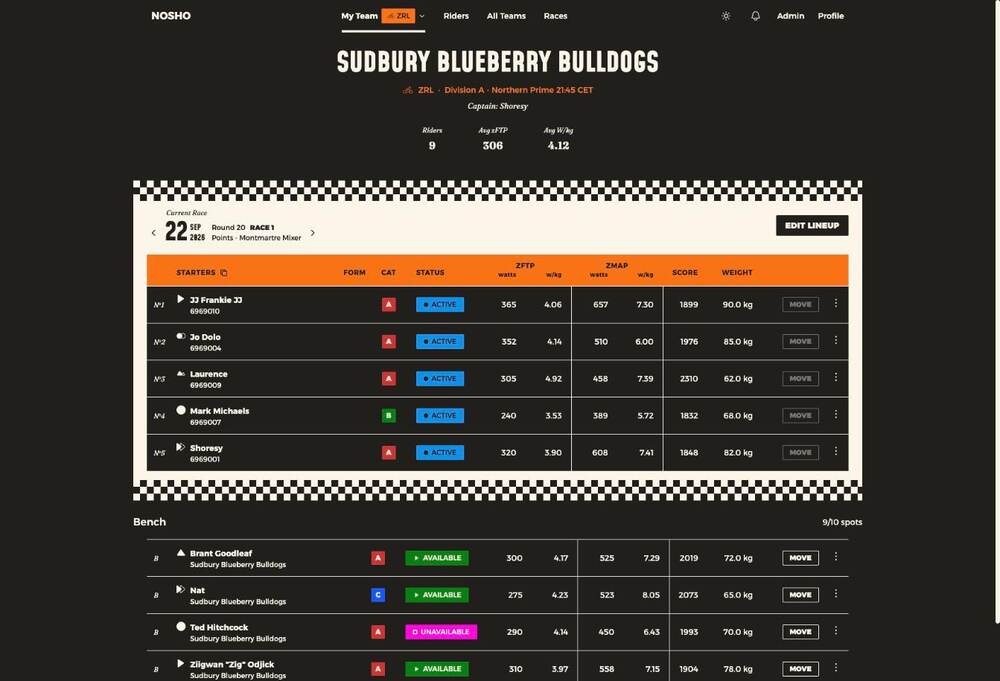
Use the arrows beside the race date to look ahead at upcoming rounds.
What the columns mean
| Column | What it shows |
|---|---|
| The glyph beside a name | That rider's phenotype — sprinter, climber, rouleur and so on |
| Cat | Racing category, A to D |
| Status | Whether they can be picked, and whether other clubs can borrow them |
| zFTP / zMAP | Watts and w/kg, synced from Zwift |
| Score | Zwift racing score |
| Form | How they've gone across their last five events — rising, steady or falling |
What you can and can't do here
You can read everything, open any rider's details, and step through upcoming races. Moving riders and setting the line-up are the captain's job — those controls won't do anything for you.
Form is a trend, not a verdict
It reflects your recent five events. A quiet month will show. It's a picture of your current run of form, not a judgement on you as a rider.