My Team is where you'll spend your time. The current race sits top left with arrows to step through rounds; the squad below splits into Starters and Bench.
The button top right reads Set Line Up until a line-up exists, then Edit Lineup.
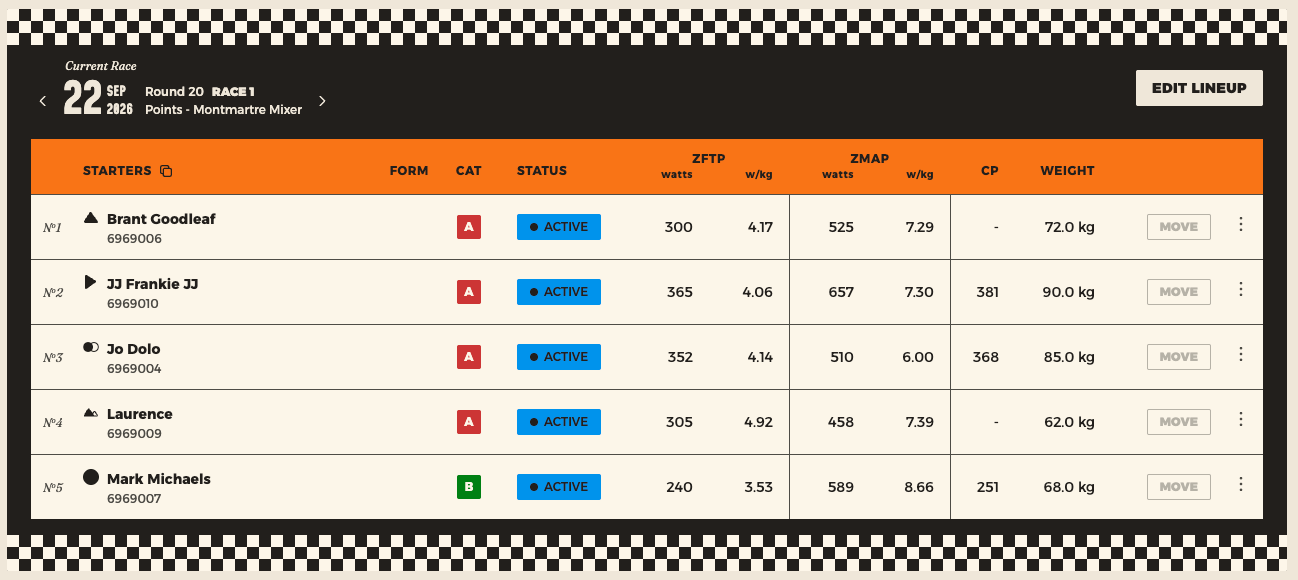
The columns
| Column | What it's for |
|---|---|
| Glyph beside the name | The rider's phenotype — sprinter, climber, rouleur and so on |
| Cat | Racing category A–D. Determines who you're allowed to borrow |
| Status | Whether you can pick them, and whether other clubs can borrow them |
| zFTP / zMAP | Watts and w/kg, synced from Zwift |
| CP | Critical Power — what the rider can sustain. Sortable |
| Form | Performance across their last five events — rising, steady or falling |
| Weight | Used for w/kg. Your club may require this verified |
CP — the column that replaced Score
Rider rows used to show a Racing Score. They now show CP, and the difference is worth understanding because it changes how you pick.
Score told you how a rider had placed. CP tells you what they can sustain — it's fitted from the 3-, 5- and 12-minute bests on their Zwift power curve, so it's worked out the same way for everyone regardless of what fields they happened to enter.
For selection that's a far better gauge. A rider who's been racing above their level and finishing badly had a poor Score; their CP tells you what they'd actually contribute.
⚠️ A dash doesn't mean weak
CP only works for riders who've connected their Zwift account — without it there's no 3- or 12-minute point to fit against, so the rider shows "–".
That's a large minority of riders, not a handful. Sorting by CP floats every unconnected rider to one end of the table, and they aren't your weakest riders — they're your unlinked ones. Don't read that end of the sorted list as a ranking.
If you want a rider's CP to appear, the fix is theirs to make: Profile → Connections → link Zwift, and it fills in on the next sync.
✅ Form is still the selection column
zFTP and CP tell you what a rider is capable of. Form tells you whether this is one of those weeks. Two riders with identical numbers aren't the same pick if one is trending up and the other has been quietly fading — and the rider on the way up often won't have mentioned it.
Bench capacity moves
⚠️ Spots belong to the race, not your team
The bench header shows something like 9/10 spots, and that number comes from the race's own settings — maximum starters plus maximum bench. Step to a different round and your capacity can change. If seats seem to have vanished, check which race you're looking at.
Checking a single rider
Click any rider's name to open the rider curtain — their phenotype, category, tier, physiology, and availability across the next several races in one panel.
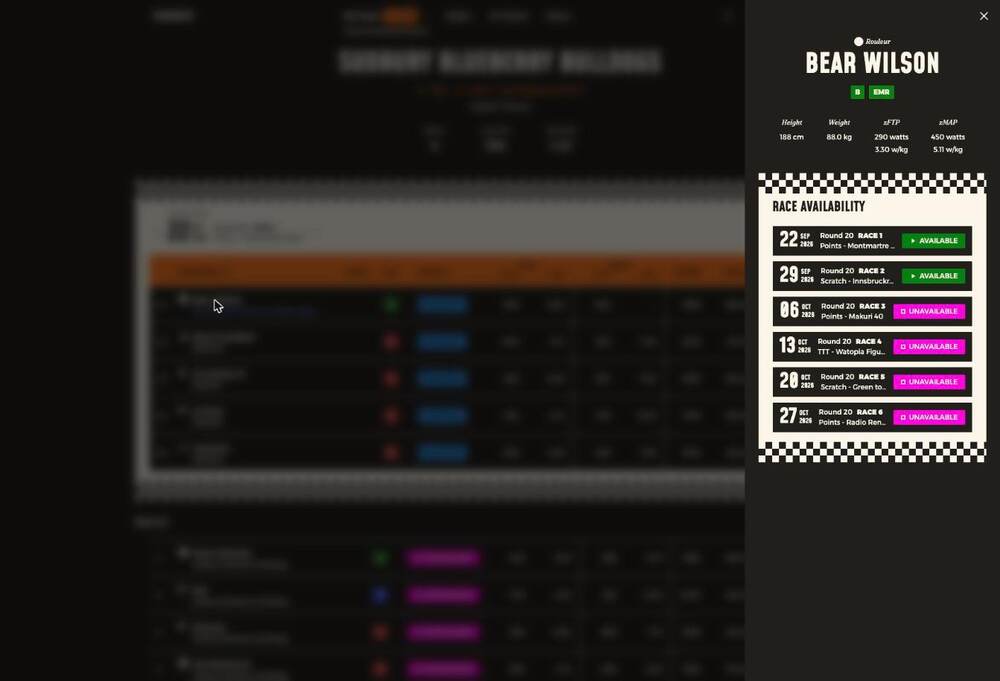
It's the fastest answer to "is this rider around for the next few rounds?", and it's the screen most captains never find.