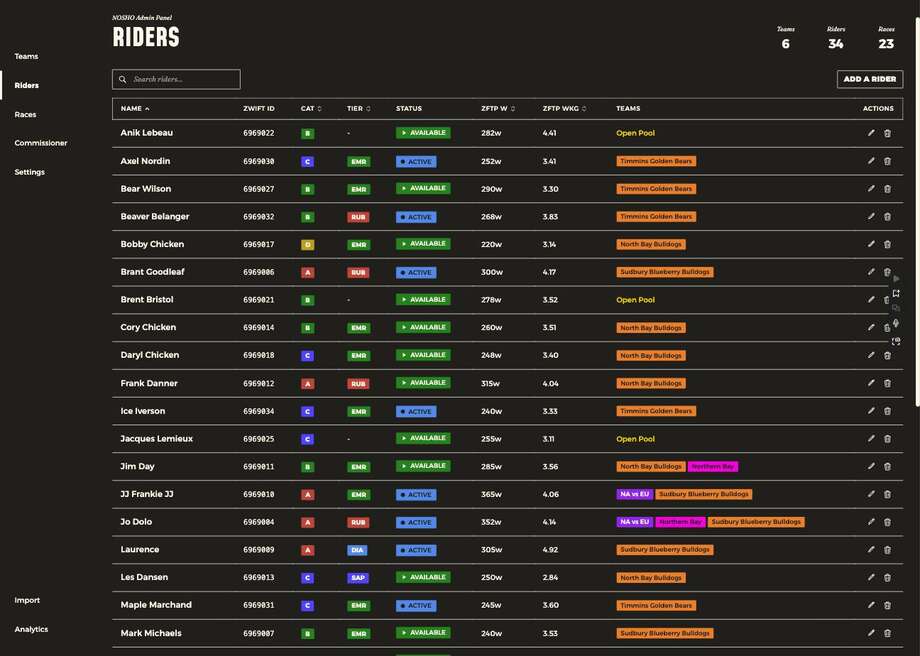
Every rider in the club. Note the Teams column: a rider can carry several chips at once, because they hold one team per race type. Riders with no team show as Open Pool.
Editing a rider
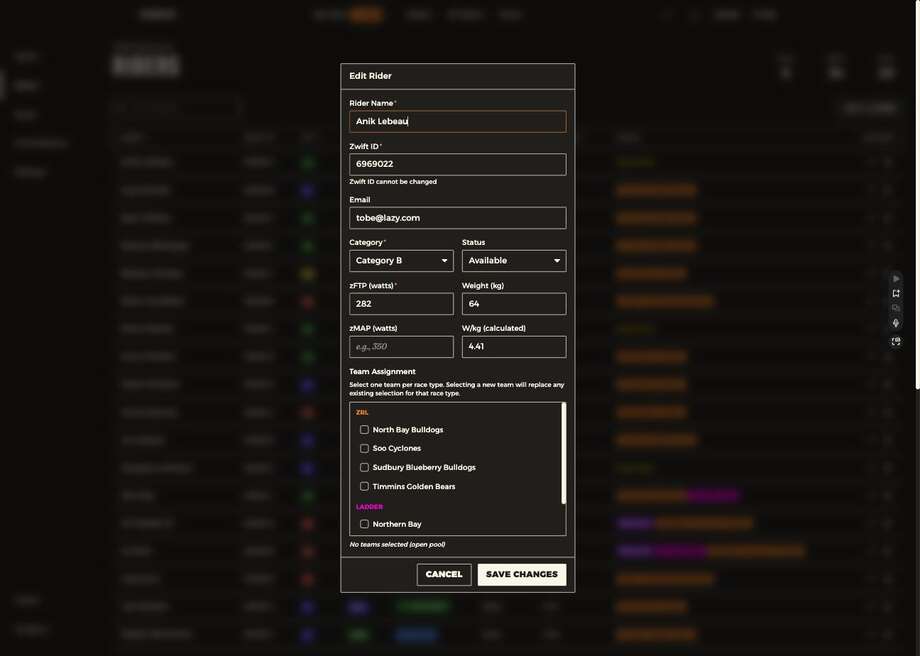
| Field | Notes |
|---|---|
| Rider name | |
| Zwift ID | Cannot be changed once created |
| Category | A–D |
| Status | Where you set Inactive |
| zFTP, weight, zMAP | zMAP optional |
| W/kg | Calculated, not entered |
| Team assignment | Grouped by race type — one team per type |
Team assignment says it plainly: "Select one team per race type. Selecting a new team will replace any existing selection for that race type."
Use Inactive instead of removing someone
✅ The retention setting
A rider taking a break stays on the club's books, doesn't consume a roster spot, and doesn't reappear in the free agent pool for another club to claim. Removing them loses them — usually to whoever claims them first.
Prospects
Riders who signed up through your club recruitment link arrive as Prospect — in the club, on no team. They're visible to commissioners only. Check for them regularly; a prospect nobody assigns is a rider who quietly gives up.